
All pages have a search box near the top right which can be used to quickly find objects you have the rights to view.
Below that are a set of tabs which you can use to go to different areas depending on the objects you need to adjust. When you click one of these tabs it will default to showing you the last subsection you were looking at, you can click again to go back the top of the section.
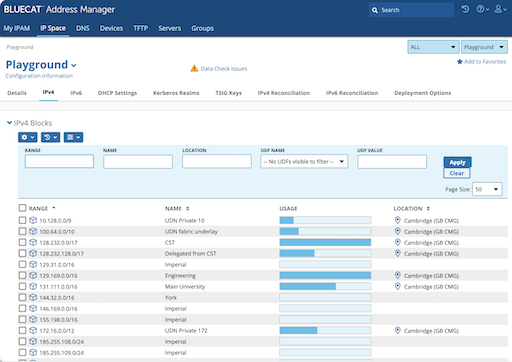
Additionally, you can switch between the "Production" and "Playground" configurations using a dropdown just below the search box. The playground is only published to playground.dns.cam.ac.uk whereas data in the Production section is propagated to various live servers.
My IPAM
This provides a dashboard, we recommend you use the favourites and tags dashboard items to provide shortcuts to commonly used areas of the system, but beyond that you're better off going to the object specific areas.
IP Space
At the top level this is view only, with IPv4 blocks, IPv6 blocks and some sections related to globally relavent configuration.
If you click on a block, you should see any blocks it contains, along with any networks you have access to.
When you have access to a network, and you click on it in from the listing you should be shown a listing of the addresses in that network. Network can also be subdivided into IP Groups which are groups of networks. Additionally, you can set "Deployment Options" which allow you to adjust DHCP settings for the network or IP Group.
DNS
The top level of DNS defaults to showing the two views in operation. We use views to separate "cam.ac.uk" from "private.cam.ac.uk." In addition to views there are some other sections, but these are for administration only.
Within each view you can see
Zones
DNS Zones are kept in this section, in a heirarchy. Annoyingly, when opening most zones it defaults to showing the Resource Records, which is not normally what you want. Instead, you have to click "Sub Zones" to get the list of zones contained within the current zone.
External Hosts
These are used as targets for CNAME/Alias records when the record is not visible in the same view. These have to be created outside of the address manager.
Other sections
RP Zones: Response Policy Zones (related to CSIRT DNS block lists) Zone Templates: We are not using these at present ENUM: We are not using these at present DNS64: We are not using this at present Deployment Options: Admistration only Deployment Roles: Where the DNS data is published (admin only) Naming Policy: Admin only
Devices
We are not using this at present
TFTP
We are not using this at present
Servers
This is currently restricted to staff who manage the BlueCat system
Groups
This contains Tags, Device Types and Locations
Tags
Tags are a heirarchical structure of names which can be applied to most objects in the system.
Locations
Another heirarchical structure covering the entire world in varying detail